WORKFLOW Release 2026.1.08
VERSION 2026.1.08
What’s New
Dashboard Summary Improvements
Default Landing Page Selection
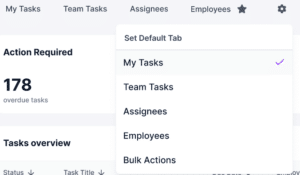
Users can now select their preferred Dashboard Summary landing tab (e.g., My Tasks, Team Tasks, Assignees, Employees, Bulk Action where applicable).
- Click the gear icon to set your default tab
- The selected tab is marked with a star to indicate its default status
- The selected view is saved per user and persists across sessions
This allows users to land directly on the view most relevant to their role (for example, Employees), helping streamline daily workflows and improve adoption.
Note: This feature is hidden in Shared Dashboard View to avoid confusion.
Shared Dashboard View Enhancements – When viewing another user’s dashboard, task counts now reflect that user’s data. A clear indicator shows when you are viewing a shared dashboard, with an option to return to your own view.
Dashboard UI Updates – Updated styling for headers, filters, badges, and tables improves consistency and usability across the Dashboard Summary experience.
Malay & Swedish Language Support
Workflow and employee portals now support Malay and Swedish, including translated UI text, buttons, and workflows. Employees can complete events and tasks in their local language, improving accessibility for global teams.
Bulk Action – Forms Review & Approval
Bulk Action is now available for forms, allowing users to review and approve multiple forms from a centralized dashboard.
- Supports both Classic and Smart Forms
- Provides improved visibility into pending form reviews
- Allows users to preview completed forms and take action directly from the dashboard
- Supports timestamps and auto-populated approver fields when configured
Resolved Issues
Event AI Summary: Reliability Improvements – Resolved an issue where Event AI Summary could return intermittent errors when loading or saving task definitions.
Forms
Form Rules: Dynamic Field Behavior – Rule Sections can now show or hide content based on user responses to form fields, improving flexibility and accuracy in form workflows.
Form Rules: Section Permissions – Permissions can now be applied to elements within Rule Sections (such as signatures), enabling more precise control over visibility and completion.
Classic Forms: Publish & Checkout Access – Forms can now be published or unchecked out by users other than the original creator, preventing forms from becoming locked.
Smart Forms: Two-Part Form Display – Resolved an issue where certain two-part Smart Forms did not display completed employee data or could time out when printing.
Dashboard Summary
Shared Dashboard: Tile Count Accuracy – Resolved an issue where dashboard tiles could display incorrect counts when viewing another user’s dashboard.
Hotfix Updates (April 15 Staging)
Portal Tasks: Redirect Error Resolved – Resolved an issue where employees could encounter an access error after canceling or completing a task from the portal. Users are now correctly returned to the portal dashboard without interruption.
Task Management: Self-Completing Tasks with Dependencies – Resolved an issue where certain self-completing tasks with dependencies could remain active instead of completing automatically, preventing dependent tasks from progressing. Tasks now complete as expected, allowing workflows to continue without interruption.
Hotfix (April 20)
Hotfix Update
A pre-release issue identified during staging testing that could affect task completion behavior has been resolved. The 2026.1.08 release will proceed to production as scheduled, with no expected impact to client environments.