When employees move on to other opportunities, offboarding is often where good processes go to die.
The minute someone’s exit date hits, HR, IT, and managers are suddenly running a relay race across your HRIS, Microsoft 365, SaaS apps, devices, badges, and compliance docs. If the handoffs are manual (or worse, left to “tribal knowledge”), you get the greatest hits: accounts left open, laptops that vanish, owners who never get reassigned, and an audit trail that reads like a mystery novel.
That’s why employee offboarding automation matters. It turns offboarding from a scramble into a sequence that’s triggered once, executed consistently, and visible to everyone who has work to do.
The goal isn’t to remove humanity from the exit process. In fact, respectful, structured offboarding protects both the employee and the organization. But empathy doesn’t eliminate operational risk. It needs to be supported by systems that execute reliably every time, regardless of role, location, or termination type.
This is where integrated workflows matter.
When offboarding is managed through disconnected tickets, manual emails, and shared spreadsheets, it becomes fragile. One missed notification can leave access open. One delayed trigger can stall deprovisioning. One unclear owner can create compliance exposure.
By contrast, an automated workflow treats offboarding as a coordinated system event. HR triggers the exit once. Downstream actions cascade automatically, like IT tasks, access revocation, asset recovery, and compliance documentation. Everything is visible, trackable, and enforced in sequence.
TL;DR
- Employee offboarding automation reduces security, compliance, and operational risk
- The process must integrate HR and IT systems to work reliably
- Triggers, sequencing, and audit trails matter more than reminders
- Platforms like Rival enable automated, role-aware offboarding journeys
- Learn how integrated workflows support secure exits with software for employee offboarding.
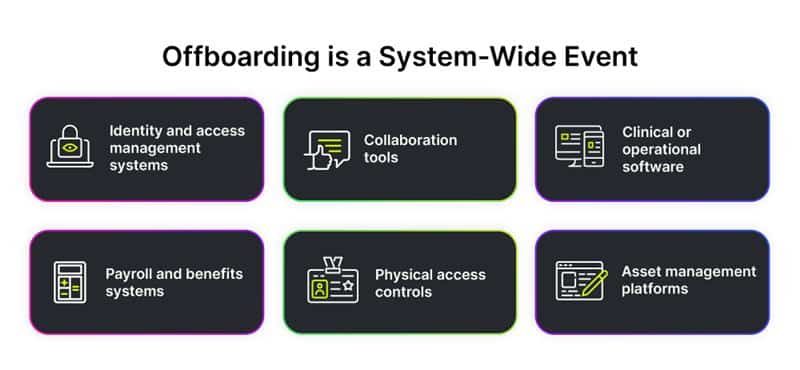
Why Offboarding Needs to Be Treated as a Systems Event
Every employee exit touches multiple environments:
- Identity and access management systems
- Collaboration tools (Microsoft 365, Google Workspace, Slack)
- Clinical or operational software
- Payroll and benefits systems
- Physical access controls
- Asset management platforms
In many organizations, these systems don’t talk to each other automatically. Instead, offboarding relies on handoffs. Maybe HR sends a notification, IT creates tickets, managers remember to collect equipment, or someone updates a spreadsheet.
It often works (until it doesn’t).
A properly automated offboarding workflow starts with a single source of truth, usually the HRIS, and uses that event (resignation, termination, contract end date) as the structured trigger for downstream actions. That trigger activates predefined tasks across teams, with built-in sequencing and visibility.
Modern HR workflow software makes this orchestration possible without custom scripting or fragile integrations. Instead of building separate automation inside Microsoft 365, another inside your ITSM tool, and another inside your HRIS, the workflow layer coordinates them.
That coordination is what prevents overlap, gaps, and expensive mistakes, especially in regulated or high-risk environments.
Creating an Automated Employee Offboarding Workflow
A clean offboarding workflow starts with architecture.
1. Align the Source of Truth Between HR and IT
Before you automate anything, you need agreement on what triggers the process. In most organizations, that trigger lives in the HRIS: resignation submitted, termination approved, or contract end date entered.
If HR and IT rely on separate triggers, you introduce delay and risk immediately. The workflow should be anchored to a single authoritative event, with structured data fields (exit type, effective date, manager, department) that determine what happens next.
2. Configure the Initial Trigger Based on Exit Date
Timing is everything in offboarding. Access shouldn’t disappear too early and it definitely shouldn’t linger too long. Automated workflows allow you to configure conditional logic:
- Immediate deactivation for involuntary terminations
- End-of-day revocation for standard resignations
- Delayed actions for knowledge transfer windows
With Rival Workflow, HR teams can configure these rules without writing custom scripts or relying on IT ticket queues.
3. Revoke Access to SaaS Applications in Sequence
Blanket deactivation sounds clean, until you realize someone needed to transfer ownership of a shared drive or client account first.
Automated offboarding workflows handle sequencing. Ownership transfer tasks are assigned and confirmed before system access is revoked. Integration points with identity providers or ITSM systems ensure that access removal is documented and traceable.
This is where “how to automate employee offboarding” moves from theory to risk management.
4. Transfer Knowledge and Ownership Automatically
When someone exits, their work doesn’t disappear. It has to be redistributed and reassigned. Often it takes a while to backfill a role (if that’s in the cards), so a structured workflow will assign pre-configured tasks to managers:
- Reassign accounts
- Document process knowledge
- Confirm handoff completion
Because these tasks are triggered automatically and tracked centrally, they don’t get lost in inboxes.
5. Recover Physical Assets
Devices are often the most visible offboarding failure, and the easiest to automate.
Workflow-generated tasks can assign asset return steps, track confirmations, and escalate when deadlines are missed. Integration with asset management systems reduces reliance on spreadsheets and manual reconciliation.
6. Document the Process for Compliance
If you can’t show what happened, you can’t prove compliance.
Automated workflows generate audit trails by default. Each task completion, approval, and deactivation is timestamped and attributable. This is particularly important in regulated industries or during reductions in force.
For broader considerations during downsizing, see our post on Employee Offboarding: 3 Things to consider During a Furlough or Layoff
7. Run a Post-Offboarding Audit
Automation won’t eliminate reviews and auditing, but it makes them easier. A post-exit audit can be configured to confirm:
- All access was revoked
- Assets were returned
- Documentation was archived correctly
Because the workflow data is centralized, audits become verification exercises instead of forensic investigations.
How to Align IT and HR Needs When Automating Offboarding
If offboarding automation fails, it usually fails at the seams between groups. Everyone assumes someone else is handling something. Maybe they are, but maybe they aren’t. Automating employee offboarding only works when HR and IT agree on three things: the trigger, the sequence, and the source of visibility.
Oftentimes, HR thinks IT is handling access, IT assumes HR already confirmed the exit date, and managers believe someone else collected the laptop. The problem isn’t competence. It’s coordination.
Establish a Shared Trigger—Not Two Parallel Ones
To get great coordination, offboarding employees should start with a structured data event inside your HRIS. When the exit date or termination status changes, that update should automatically initiate the offboarding workflow, including IT tasks. If IT still relies on a separate manual ticketing process as the primary trigger, you’ve reintroduced lag and risk.
A properly configured workflow ensures HR owns the status change, and IT receives immediate, system-generated tasks with the relevant data attached.
Build Sequencing Logic Together
Not all exits are equal. Voluntary resignations may allow for knowledge transfer windows. Involuntary terminations may require immediate access revocation. Contractors may require different documentation steps than full-time employees.
These decisions shouldn’t be improvised mid-exit. HR and IT should agree in advance on:
- When deprovisioning occurs
- Which systems shut off immediately
- Which require confirmation before disabling
- How ownership transfers are validated
Workflow automation makes this configurable, but alignment makes it correct.
Use Dashboards for Real-Time Visibility
One of the biggest sources of friction is visibility. HR wants to know access is revoked. IT wants confirmation that exit paperwork is finalized. Managers want to know what’s left to do. Instead of relying on status emails, a dashboard provides live workflow tracking:
- What tasks are complete
- What’s pending
- Who owns the next action
- Where deadlines are at risk
This reduces back-and-forth and turns offboarding into a transparent, accountable process.
Rival Workflow centralizes this visibility, allowing HR to see outstanding tasks in one real-time view rather than separate tools.
Coordinate Knowledge Transfer Before Deprovisioning
One of the most expensive offboarding mistakes is revoking access before critical information is transferred. Workflow automation allows you to assign structured knowledge transfer tasks—with confirmations—before certain systems are disabled. That sequencing protects business continuity without compromising security.
It’s not about slowing down deactivation. It’s about disabling intelligently.
Track Assets and Access Together
Device recovery and system access are often treated as separate tracks. They shouldn’t be. A shared workflow can coordinate:
- Laptop return deadlines
- Badge deactivation
- VPN access removal
- Final access confirmation logs
When these tasks live in separate systems without shared visibility, gaps appear. Automation collapses those silos into one coordinated sequence.
Review Post-Exit Metrics Together
The final alignment step in an HR offboarding checklist is the one most teams skip: learning from the data. After exits, HR and IT should review metrics like:
- Time to full deprovisioning
- Asset recovery delays
- Incomplete knowledge transfer tasks
- Exception frequency
Because automated workflows generate structured data, these conversations become objective. You’re refining a system, not assigning blame.
Automate Your Employee Offboarding Process with Rival
When HR and IT operate from a shared workflow, offboarding stops being reactive and starts being controlled.
Rival Workflow helps organizations design automated, role-aware offboarding journeys that integrate HR data, IT actions, asset tracking, and compliance documentation into one orchestrated process.