
RECRUIT Release 2026.12
VERSION 2026.12
What’s New
Conversational Analytics (Beta)
Tier 3 Custom Analytics users can now query Recruit data using natural language, powered by Gemini AI via Looker. A new Conversational Analytics page is available in the left navigation — type a question like “How many candidates applied last month?” or “Which job has the highest time-to-fill?” and get instant visualizations and answers. Supports multi-turn conversations, fast mode for quick lookups, and thinking mode for complex analytical questions. No analytics expertise required. Available to Tier 3 users when the feature is enabled by your administrator. This release also restores the “All Results” download/schedule option for Tier 3 users (temporarily unavailable due to a Google platform change). Tier 2 and Tier 1 users are unaffected.
See Help Center for more details. This feature is currently in Beta.
“Imported By” Filter on Candidate Search
A new “Imported By” filter is now available in the Candidate Pool search filters, allowing recruiting managers to filter results by who imported a candidate. Select a team member from the dropdown to see only the pipeline candidates they sourced — useful for reviewing recruiter activity and workload distribution.
Source with ROSI — Job Pipeline Import
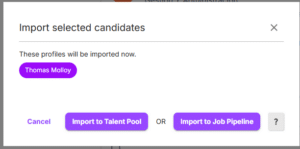
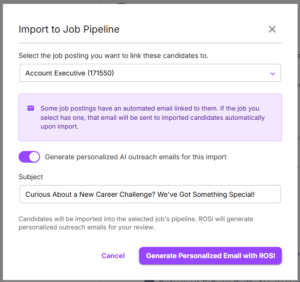
When importing candidate profiles from Source with ROSI (Search or Chrome Extension), a new two-step modal now lets users choose between importing to the Talent Pool (general candidates, no job association) or importing directly to a Job Pipeline. The Job Pipeline option presents a job selection dropdown, allowing recruiters to associate imported profiles with a specific job during the import action — eliminating the extra step of navigating to the profile afterward. If the selected job has a pipeline email template configured, an info banner confirms that the automated notification will be sent to the imported candidate. Additionally, profiles imported via the Chrome Extension can now be linked directly to a job pipeline during the import flow.
Interview Scheduling Email Improvements
- The button label in pre-scheduling emails has been renamed from “Reschedule or Cancel” to “Schedule Now” to better reflect the candidate action.
- When adding custom buttons or links to scheduling emails, the URL field now validates the protocol prefix — URLs must start with https://, mailto:, or tel:.
Resolved Issues
Sourcing & Pipeline
- Candidate Profile PII Anonymization — Anonymized pipeline candidate profiles now display email addresses as plain text (no longer clickable), the “Source with ROSI” button is removed, and the Take Action menu is restricted to essential options only. Additional PII Anonymization improvements are in progress.
- “Job Apply Link – Pipeline Candidates” Merge Field — Now available in Send Email on the Candidate Resume Profile, Contact (ROSI Outreach), and Send Email in Candidate Pools. Previously only available in Email Templates. Visible for clients with CX Career Sites enabled.
Analytics
- Spanish Translations — Report titles and descriptions on the Analytics Library page now fully translate to Spanish.
- Analytics Locale Fix — Embedded analytics dashboards no longer display in Spanish when the user locale is set to English (Spain region).
CX Career Site
- SMS Opt-In Consent — The SMS opt-in checkbox on the apply form is now unchecked by default to align with carrier consent regulations (TCPA/CTIA). The consent label now dynamically displays the Employer Name for clearer disclosure.
- Date Picker — Clicking the month/year header now correctly opens the month/year selector.
- Phone Number Validation — Updated area code metadata; valid US phone numbers with newer area codes are no longer rejected.
Coming Soon
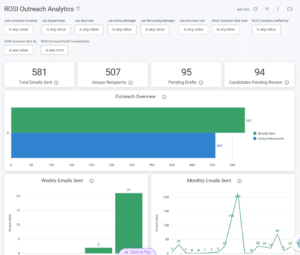
AI Outreach Analytics Dashboard
A new pre-built “ROSI Outreach Analytics” dashboard will be available in the Analytics Library, providing managers with visibility into outreach email volume, send rates, recipients, and usage trends by job, department, and location. Coming in the next release. Data available now in Custom Analytics – learn more.
Sequential Interviewing
Full launch of sequential interview scheduling — schedule interviewers in sequence with configurable time blocks, interviewer pools, and breaks between sessions.