
PERFORM Release 2026.1
VERSION 2026.1
What’s New
Home Page Design update
Perform now includes a refreshed home page layout that makes day-to-day work easier to manage at a glance.
- The task list is now visible by default (no need to expand the Welcome card)
- Performance summary cards (Goals, Feedback, Reviews, and more) are now displayed in a right-side panel, alongside the task list
- The updated layout helps users track priorities and performance activity more quickly without extra clicks

ROSI Admin Enablement
ROSI is now available in Perform as a knowledge agent for System Admins—and is disabled by default to support organizations with AI restrictions or governance requirements.
- Enable ROSI in Admin > Enable Apps > ROSI Enabled
- The enablement area includes an info icon describing ROSI
Once enabled, ROSI helps admins get faster answers using Perform performance data (Goals, Feedback, Reviews, and Check-ins), reducing the need to manually search across multiple pages.
Analytics Navigation Improvements
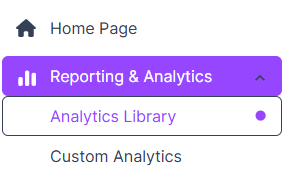
Updated analytics naming and organization for easier reporting access—Overview Dashboard is now “Analytics Library,” and Advanced Analytics is now “Custom Analytics.” This update improves discoverability and helps teams navigate between “pre-built dashboards” and “self-service reporting” more intuitively.
Custom Analytics Downloads (No Row Limits)
Users can now export larger datasets from Custom Analytics without download size limits across all tiers.
Coming Soon
ROSI Review Writer (Admin + Manager)
ROSI Review Writer will help admins and managers draft more consistent, personalized performance reviews by combining:
- Relevant performance context from Perform (goals, feedback, check-ins, review history)
- Manager-provided coaching notes (strengths, growth areas, ratings)
This capability is designed to reduce review-writing effort, improve review quality and consistency across teams, and support faster review cycles—especially for managers with multiple direct reports.