RECRUIT Release 2026.2
VERSION 2026.2
What’s New
Clearer Candidate Indicators
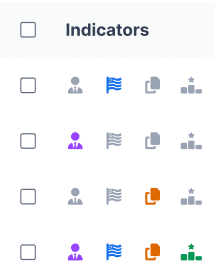
Recruit now displays clearer visual indicators in the Candidate Pool, helping teams quickly understand candidate context at a glance. Indicators appear consistently across views and are displayed in a standard left-to-right order.
Indicators include:
-
Current or former employee
-
U.S. Veteran status
-
Multiple applications
-
Candidate is already in an Offer or Hired stage for another role
Indicator visibility is managed through existing ATS settings:
-
Current / Former Employee – Displayed automatically (no setting required)
-
U.S. Veteran – Controlled by the “Icon for Veteran Candidates” setting
-
Multiple Applications – Controlled by the “Icon to Indicate Candidate has Applied to Multiple Jobs” setting
-
Offer/Hired for Another Position – Uses the same setting as “Icon to Indicate Candidate has Applied to Multiple Jobs”
These settings allow admins to enable or disable specific indicators based on their organization’s workflows and compliance needs.
Candidate Pool Visibility Controls
Recruit now supports stronger visibility controls in the Candidate Pool through Candidate Pool Filter Locking, allowing admins to enforce default filters so Hiring Managers and Recruiters only see candidates who meet required screening criteria.
Admins can:
- Enforce Fail Flag and/or Qualified filters
- Apply enforcement by role (Recruiter, Hiring Manager)
When enabled:
- Enforced filters apply automatically when the Candidate Pool loads
- Locked filters appear read-only and cannot be changed
- A system message explains why results may be limited
Configure in Settings → ATS → Candidate Pool Filter Locking
This capability helps ensure consistent candidate review, supports compliance-driven hiring workflows, and reduces noise from ineligible applicants.
Improved Job Template Navigation
Job Templates are now directly linked to Job Tracking. Recruiters can click the number of job postings tied to a template to instantly view those postings—automatically filtered and sorted for faster review. A new Job Template filter on the Job Tracking page also makes it easier to find postings tied to both active and inactive templates.
Resolved Issues
Interview Scheduling – Scheduling filter dropdowns now close correctly after selection.
Reviews & Inactive Jobs – Review actions and tasks are no longer available for inactive or closed jobs.
Source with ROSI – Saved searches now retain the Email Address filter when re-run.
Chrome Extension – Imported profiles now display the correct import date for clearer sourcing history.
Candidate Experience – Application, resume upload, and resume update flows now proceed correctly when selecting Submit or Continue.
Coming Soon
AI Powered Skills Matching (ROSI Match)
Recruiters will soon see top candidate matches directly on the Job Posting Details page, with match insights powered by ROSI’s skills extraction and comparison.