
LEARN Release 2025.12
VERSION 2025.12
What’s New
Course Creation Redesign
The Course Creation Redesign delivers a completely reimagined experience for admins and content creators in Rival Learn. While positioned as a UI upgrade, this release represents a major workflow transformation—making it easier than ever to build, organize, and preview learning content.
Highlights
-
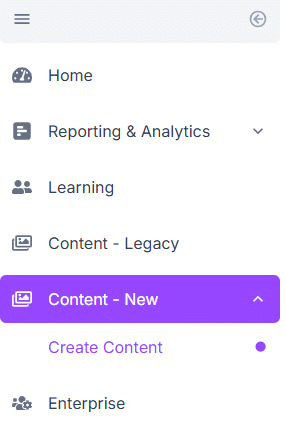
New Create Content workspace under Content-New for building, previewing, and managing draft courses before publishing.
-
Streamlined authoring workflows: Replaces multiple pop-up windows with a clean, tabbed layout, allowing admins to move step-by-step through course setup without losing context.
-
Redesigned interface: Modernized layout, clearer hierarchy, and refreshed skin improve readability and reduce cognitive load.
-
In-context guidance: Embedded definitions and help links clarify terminology and component functionality, helping users stay confident as they create.
-
Integrated previewing: Authors can now preview content directly within the same workspace—no extra tabs or navigation needed.
- Full continuity with Legacy Authoring: The legacy workflow remains available under Content–Legacy, and both systems share the same backend tables. All existing content will remain intact and fully accessible in both interfaces—no data conversion, migration, or re-publishing required. This ensures a seamless transition for admins while teams gradually adopt the new workflow.
Together, these enhancements transform course creation into a guided, goal-oriented process that reduces friction and helps teams publish engaging learning experiences faster.
Enablement
The new Create Content page is available to all admin users by default in the Content–New section. The original Content Management area remains accessible as Content–Legacy.
Admins can adjust visibility settings for users and workgroups under Enterprise → Admin/Workgroup → Security Setting → Content–New.
Check out our User Guide here.
My Team Page Redesign
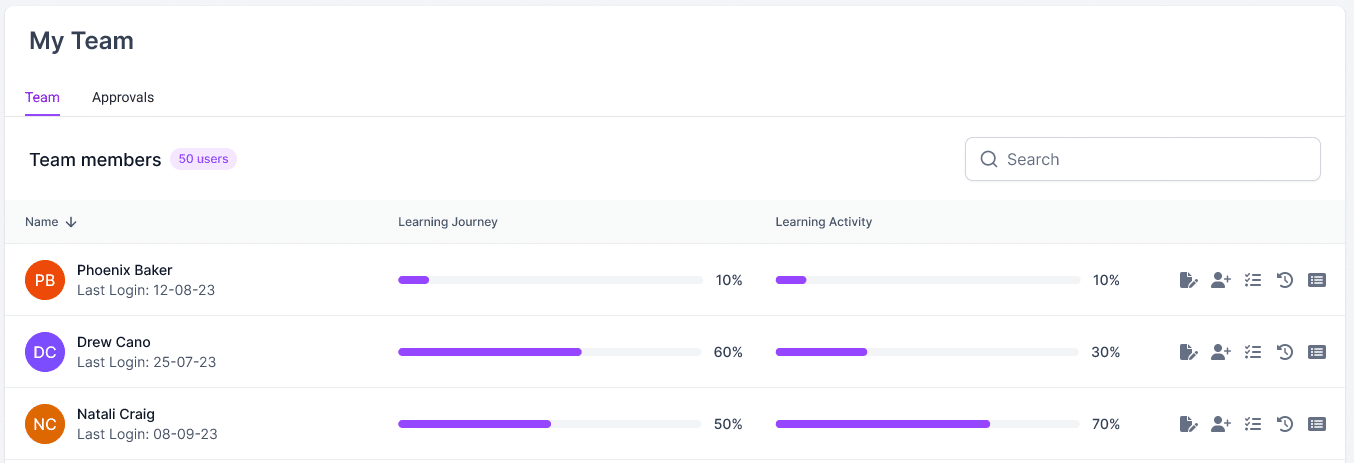
The My Team page in the Student Portal has been redesigned to give managers a clearer view of their team’s learning progress and faster access to key actions. The new layout emphasizes clarity, consistency, and ease of use—helping managers support their teams more effectively.
Highlights
-
Simplified layout for viewing all direct reports, with at-a-glance progress across Learning Journeys and Learning Activities.
-
Clickable navigation: Select a learner’s row to open their detailed page.
-
Quick-action icons for assigning training, managing registrations, and running reports.
-
Consistent pagination and visual design aligned with other modernized areas of Learn.
This redesign resolves common pain points for managers, reducing information overload and making everyday tasks faster and more intuitive.
ROSI Branding Update
Rival’s in-app help assistant has been updated from Copilot to ROSI, unifying the AI experience across Rival products.
Highlights
-
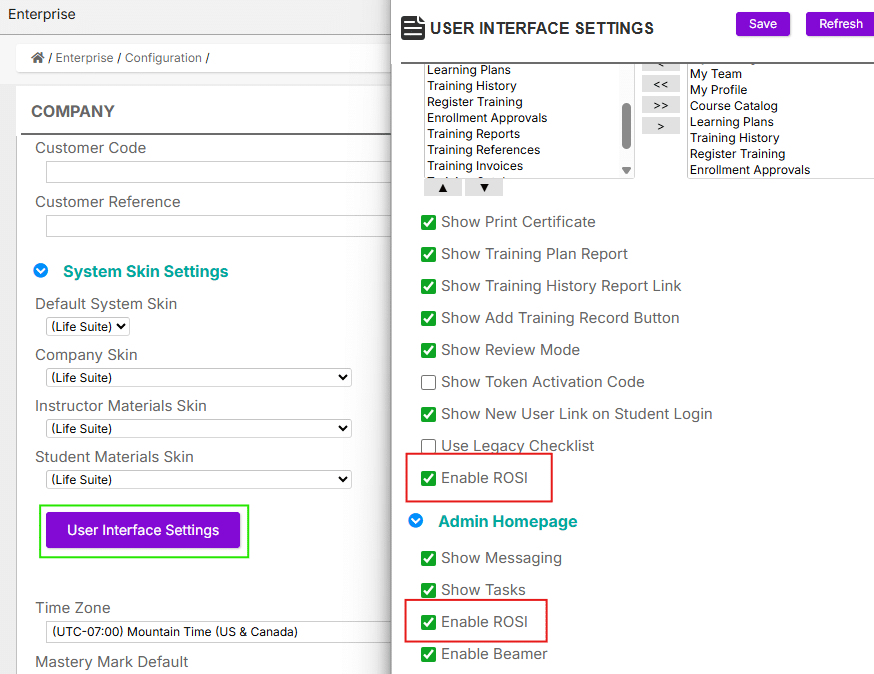
All “Copilot” references have been renamed to ROSI throughout the Learner and Admin Portals.
-
Updated Enable ROSI settings are available under Enterprise > Configuration Settings > System Skin Settings > User Interface Settings (Student Homepage and Admin Homepage). Existing client settings will remain unchanged.
-
The ROSI assistant continues to provide Help Center knowledge-base references, ensuring quick access to learning resources without leaving the app.
ROSI’s new name and interface reflect Rival’s evolving AI strategy—bringing a consistent, modern experience to in-app help across our platform.


Coming Soon
Course Publishing Redesign (ETA December)
Building on the Course Creation update, the next phase of Rival Learn’s redesign focuses on simplifying how admins publish and manage courses.
The upcoming Course Publishing experience will introduce a modernized Course page—completing the end-to-end workflow from draft creation to publishing finalized courses for learners.
Highlights
-
Centralized Course page for staging, approval, and publishing steps
-
Streamlined tabbed modals that replace pop-ups for faster, more consistent editing
-
Improved filters and search to locate courses by category, type, or status
-
Unified UI and navigation aligned with the new Create Content experience
-
Built-in preview and publishing controls for verifying course details before launch
These updates will provide a cohesive, intuitive workflow for content teams and complete the redesign of Learn’s Course Management experience.
Workflow → Learn User Sync Integration (ETA Q4)
The Workflow to Learn User Sync integration will allow admins to automatically sync user information from Workflow into Learn—reducing manual setup and keeping training access in sync with HR system updates.
This feature is fully developed and undergoing connection setup across client environments to ensure secure, reliable synchronization. Once configuration is complete, it will be released broadly for Workflow-enabled sites.